# Criczop Web Widget

### About the widget

The Criczop Web Widget is a free, easy-to-integrate cricket widget that any website can install in under 10 minutes.

**Key features**

* **Completely Free:** No cost for any website.
* **Quick Installation:** Get up and running in less than 10 minutes.
* **Highly Customizable:** Tailor the widget’s UI to seamlessly match your site’s look and feel.
* **Revenue Sharing:** Earn revenue by participating in Criczop’s monetization program.
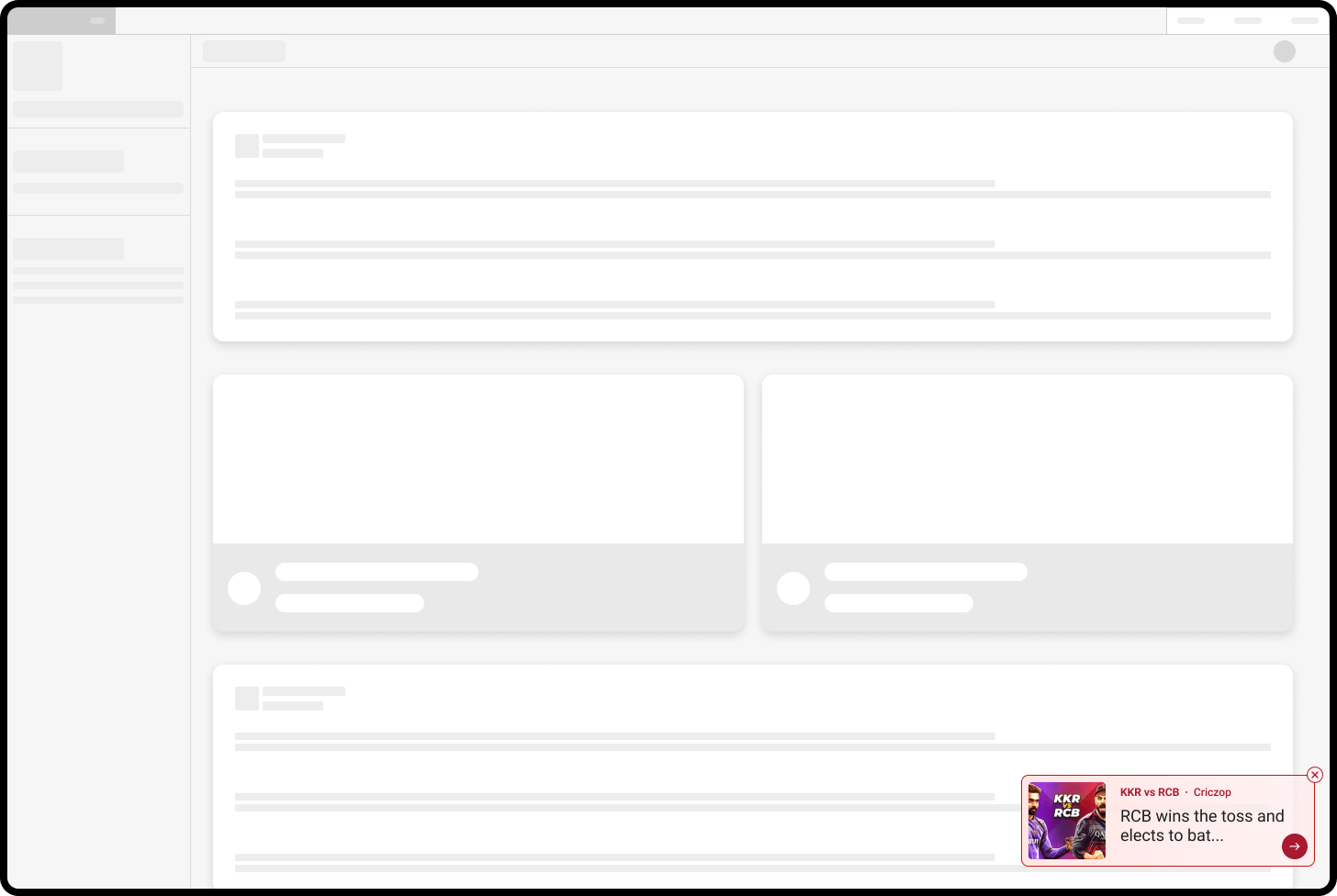
<figure><img src="/files/YjQvrXpj2g5DvzjG1CTj" alt=""><figcaption></figcaption></figure>

***

### Live updates

**The Criczop Web Widget stands out for its dynamic live updates that keep your users engaged with fresh cricket action.**

When first loaded, it displays customisable[^1] default text, such as *“Latest cricket updates and more!”*

But the magic happens soon after. Imagine a visitor browsing your page while India and Pakistan clash live. The moment Pakistan loses a wicket, the widget instantly updates to read: *“IND vs PAK: Pakistan loses a wicket!”* Clicking the widget takes the user straight to a page with live updates from that match.

As long as it’s visible, the widget refreshes at short intervals, delivering real-time cricket highlights right on your website. And when users click through to read more, they land on your Criczop Unique Link, ensuring you share in the ad revenue their visits generate.

***

### Install the widget on your site

Here's what you need to do to install the Criczop Web Widget on your site:

#### Prerequisites

Before you install the widget on your site, you will need a Criczop [Property ID](#user-content-fn-2)[^2]. If you already have a Property ID, reach out to your Gamezop Account Manager to get the widget enabled for you.

If you don't have a Criczop Property ID, you can [sign up to be a Gamezop Publisher](/publishers/get-started/sign-up.md)!

#### Installation script

Install this code on your site:

{% code fullWidth="false" %}

```javascript
<script src="https://static.criczop.com/widget/web-widget-v1.js"></script>
<script>
window.criczopWidget.setInitConfig({
   visibilityState: "expanded", // set default UI state
   propertyId: "your-property-id" // replace "your-property-id" with your Criczop Property ID
});
</script>
```

{% endcode %}

{% hint style="info" %}
If you want the widget to load up quickly on your site, then place the code given above within the `head` tags of your website.&#x20;
{% endhint %}

#### Configuration options for widget initialisation

There are 2 values that you can configure on your front-end while initialising the Criczop Web Widget, within `window.criczopWidget.setInitConfig()`

<table><thead><tr><th width="189.5">Key</th><th>Possible / expected values</th></tr></thead><tbody><tr><td>visibilityState</td><td>Defines the default visibility state of the widget. You can pass any one from 3 supported values:<br><br>1. <code>expanded</code>: The Widget is fully expanded and visible to the user when loaded.<br>2. <code>docked</code>: The Widget is docked to the right side of the page when loaded.<br>3. <code>off</code>: The Widget will not be visible to the user when loaded. You have to use the <code>window.criczopWidget.updateConfig()</code> function to update the visibility state and make the widget visible.<br><br><i class="fa-circle-exclamation">:circle-exclamation:</i> You can see references images of these states <a href="/pages/IaGdtslREvhio4GFfixL#structure-of-the-criczop-web-widget">here</a>.</td></tr><tr><td>propertyId</td><td>Your Criczop Property ID.</td></tr></tbody></table>

#### Updating the widget's visibility state

There may be scenarios where you want to dynamically control the visibility of the Criczop Web Widget. For example:

* Hide the widget on specific pages of your website
* Keep the widget docked by default, but automatically expand it on cricket-related pages

To achieve this, the Criczop Web Widget provides the `updateConfig()` method. You can call this method on the window object as shown below:

```javascript
window.criczopWidget.updateConfig({visibilityState: "off"});
```

In this function, the `visibilityState` field can accept any of these values: [`expanded`, `docked`, `off`.](#user-content-fn-3)[^3]

***

### More resources

Here are links to useful resources on the Criczop Web Widget:

* [Configure the widget's styling](/publishers/criczop/free-cricket-widget/styling-customisation.md)

[^1]: Learn more about the widget's several customisation options [here](/publishers/criczop/free-cricket-widget/styling-customisation.md).

[^2]: Learn more about Property IDs [here](/publishers/get-started/key-terms.md).

[^3]: See notes [above](#notes-on-values-that-you-can-pass-while-initialising-the-widget) to understand what these UI states mean.


---

# Agent Instructions: Querying This Documentation

If you need additional information that is not directly available in this page, you can query the documentation dynamically by asking a question.

Perform an HTTP GET request on the current page URL with the `ask` query parameter:

```
GET https://docs.platform.gamezop.com/publishers/criczop/free-cricket-widget.md?ask=<question>
```

The question should be specific, self-contained, and written in natural language.
The response will contain a direct answer to the question and relevant excerpts and sources from the documentation.

Use this mechanism when the answer is not explicitly present in the current page, you need clarification or additional context, or you want to retrieve related documentation sections.
